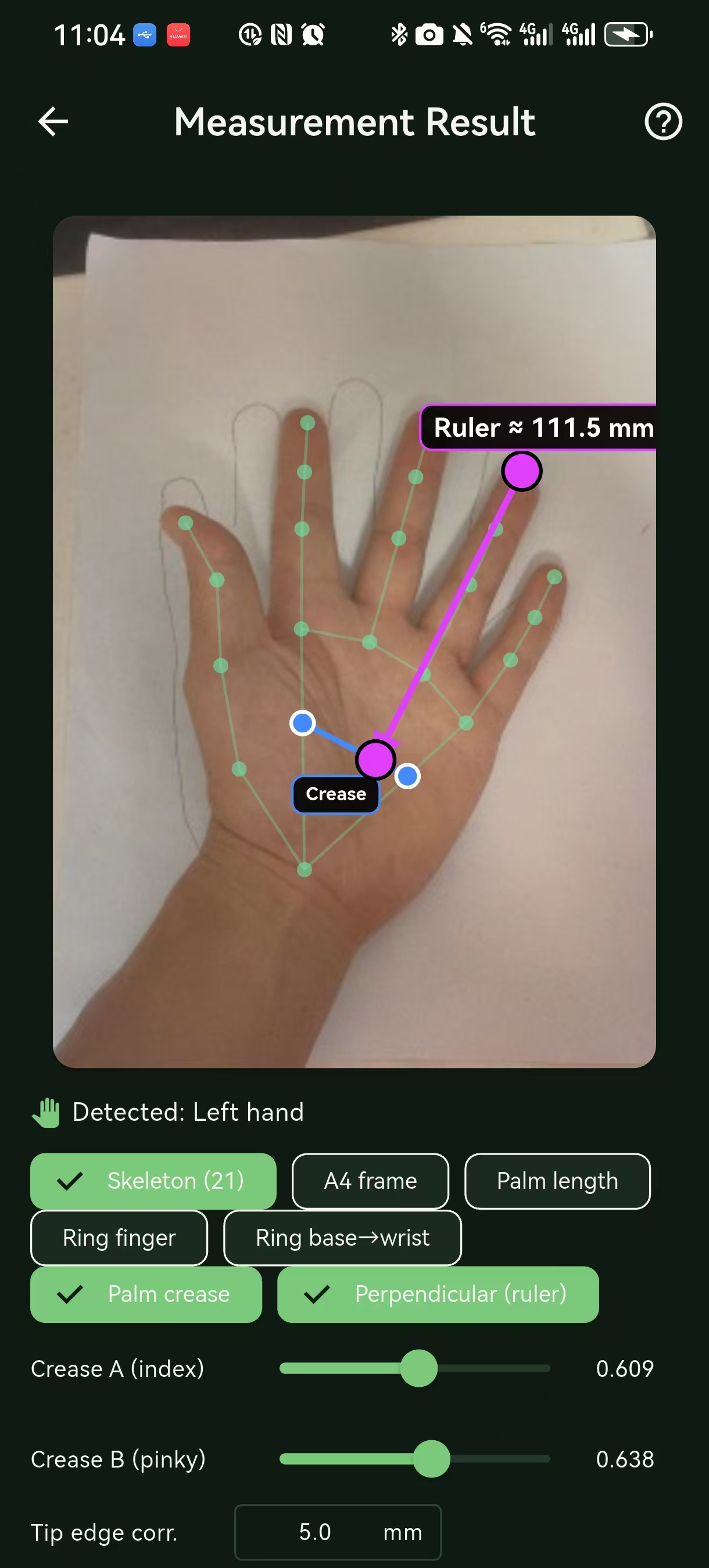
Lay an A4 sheet flat on the table with your palm resting on it.
Step 2
Take a top-down photo
Line the edges of the A4 sheet up with the green frame on screen, keep your palm open, fingers and heel fully in frame.
Step 3
See the recommendation
AI returns the recommended size and adjacent sizes. You can fine-tune manually.
What it does for you.
Six tools. One download. Works fully offline.
Grip size measurement
Two ways, one result. AI mode runs on-device MediaPipe inference from a top-down palm photo on an A4 reference and maps to Yonex, Wilson and Head-Prince-Babolat sizing. Manual mode skips the camera and computes from palm length and ring finger length, including a wrap-driven size shift. Switch at any time, both flows share the same recommended-size output.
Racket profiles
Log multiple rackets with specs and parameters, all in one place.
Restring log + expiry alerts
Record string type, stringing date and tension for each restring, set an expiry reminder, and get notified before and on the due date.
Tension conversion
Switch between DT and RT tension readings at a glance, so the number on the stringing machine matches what your racket spec sheet asks for.
Tactical board
Sketch serves, returns and patterns on a tennis court canvas. Save tactic boards alongside a match so the next time you face the same opponent you can replay what worked.
Private data sync
All records sync through your own Supabase project: grip measurements, racket profiles, restring logs, tactic boards and photos. Only you can see them. The local SQLite stays the source of truth on the device so the app keeps working offline.
Your photos sync with your account.
AI measurement runs on-device for the inference. Both the photo and the result are saved to your Supabase account, the photo in a private Storage bucket, so they follow you across devices once you explicitly push sync from one device and pull sync on the others. Local deletes do not propagate on their own.
Download
Android
Primary platform today. Minimum Android 7.0 (API 24), target API 34, about 50 MB. No root and no Google Play Services required.
Android blocks unknown sources on first install. Open Settings, Apps, Special app access, Install unknown apps, allow this source, then tap the APK again.
iOS
iOS is in TestFlight beta. The build targets iOS 15 and up, feature-complete against the Android release, but it is rough around the edges, expect the occasional crash, missing polish, and breaking changes between builds.
Tap to open TestFlight on your iPhone and accept the invite. You'll need the Apple ID signed into your device to install the build.
FAQ
AceCrush Craft Related
How do I get the most out of AI measurement, and is it accurate?+
Lay the A4 sheet flat on the table, place your palm on it, and line the four edges of the sheet tightly against the green frame on screen, with no gap and no overhang. Fingers and heel must stay fully inside the frame. Shoot straight down. When those conditions hold, the recommended size is reliable within one adjacent size, with a confidence hint shown on the result card. We do not claim millimeter precision and we do not fabricate percentages.
Do I have to use A4 paper, and what about the green frame?+
A4 is the recommended reference because its 210 by 297 mm dimensions are baked into the pixel-to-millimetre conversion. Other sheets or known-size objects work too if you tell the app their real dimensions. The green frame exists for one reason: pixel calibration depends on the A4 edges being aligned to it, so gaps or overhangs skew every downstream measurement.
What if my photo is taken at an angle, or my hand is off the sheet?+
Confidence drops to medium or low and the result can drift by one or two grip sizes. Re-take the photo from straight above, palm flat on the A4, with the sheet edges tight against the green frame. The manual path inside Grip size measurement stays available regardless: type palm length and ring finger length and skip the camera entirely.
How does data sync work across devices?+
Sync is explicit, not automatic. On the device where you made changes, open Settings and tap Push sync to upload. On every other signed-in device, open Settings and tap Pull sync to download. Local deletes do not propagate on their own. The full step-by-step walkthrough, including conflict rules when two devices edited the same record offline, lives in the cloud sync guide。